
Applicants actually finish your form.
Typed fields, conditional logic and upload rules — validated on-screen, re-checked on the server — so you collect clean data the first time.
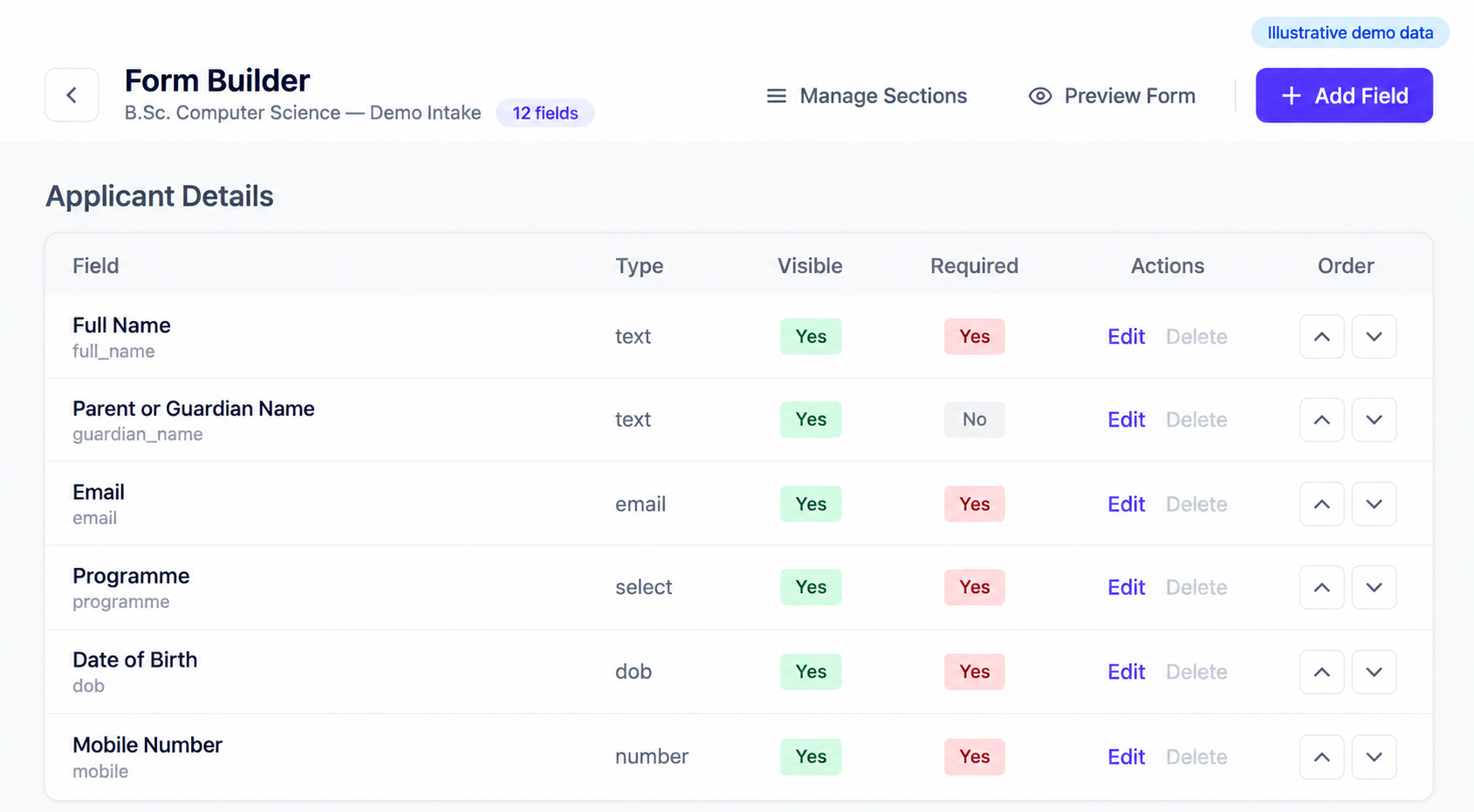









Fewer errors, less back-and-forth, cleaner data.
Conditional sections, ranked preferences and strict eligibility rules — no developer, no plugin.
15+ typed fields
Text, email, number, DOB, dropdown, radio, checkbox-group, file, photo, signature, ranked preference-group, display-only labels — each self-validating.
Conditional visibility
A parent Yes/No reveals a dropdown or checkbox-group; add "Other" free-text anywhere. Applicants see only what applies.
Rules that actually hold
Required, email, mobile/pincode/Aadhaar formats, number min/max, digit-count limits, cross-field ceilings — enforced client-side, re-validated on submit.
Restrict to a pre-approved list
Lock a field to approved Employee IDs or roll numbers, unique or shared mode, with live blur-time checks.Advanced
Add-as-many controls
Candidates add multiple qualifications or family members as repeating instances — exports stay intact.Advanced
Clone a whole course
Deep-copy a course's sections and fields to launch the next programme in minutes; reorder, insert or hide fields anytime.
Design once. Validate everywhere.
Four steps from blank canvas to clean, export-ready applications.
Drag ordered sections and typed fields onto the form until it matches your real application.
Your teamAttach validation, conditional logic and DOB age-eligibility to each field.
Your teamThe form goes live on your branded portal, mobile-first and auto-saving.
ePravesh engineThe server re-validates every submission and stores structured, export-ready form data.
ePravesh engineAdd the WhatsApp, chat and voice agents to guide applicants field-by-field — answering "what do I put here?", rescuing stalls, handing back a completed application. See the Suite →
Native to the Admission Engine; some sub-controls (allowed-value locks, repeating groups, India address cascade) are advanced options you enable per course. AI counseling agents are an optional add-on.
What teams ask before they build their first form.
Do I need a developer to build an admission form?
No. You drag ordered sections and typed fields onto the form yourself — 15+ field types including DOB, file, photo, signature and ranked preference-groups — then attach validation and conditional logic to each field. There is no plugin to install and no code to write, and the form publishes to your branded portal as soon as it matches your real application.
How does conditional logic work on the form?
A parent field controls what appears below it. Answer "SC/ST" on the category dropdown and the caste-certificate upload reveals itself; a Yes/No can unhide a dropdown or a checkbox-group, and you can add an "Other" free-text option anywhere. Applicants only ever see the fields that apply to them, which is what keeps long forms finishable.
Can ePravesh check age eligibility from the date of birth?
Yes — you attach DOB age-eligibility rules to the date-of-birth field when you set up the form. Alongside it you can enforce required fields, email and mobile/pincode/Aadhaar formats, number min/max, digit-count limits and cross-field ceilings. Ineligible candidates are stopped at the form rather than discovered later during scrutiny.
What stops someone bypassing the form validation?
The server re-validates every submission independently of the browser. On-screen rules catch mistakes while the applicant types, but the same rules are re-checked on submit, so nothing enters your records by editing the page or replaying a request. What lands in your database is structured, export-ready data.
Can I restrict a field to a pre-approved list of values?
Yes, using the allowed-value lock — an advanced option you enable per course. Lock a field to approved Employee IDs or roll numbers in either unique or shared mode, and entries are checked live at blur time. Repeating groups and the India address cascade are advanced options too, switched on only where a course needs them.
Is the form builder part of the core platform or an add-on?
It is native to the Admission Engine — no add-on required. The AI Counseling Suite is the optional part: the WhatsApp, chat and voice agents that guide applicants field-by-field and rescue stalls. Your forms publish, validate and collect clean data whether or not you enable the Suite.
Build your admission form the way it really works.
Book a demo — we'll rebuild your toughest form live, conditional logic and eligibility rules included.